


Funny _Happy Chat
4.61.86K Reviews
App Specs
- Version
- 1.2.3
- Updated On
- License
- Free
- Downloads
- 500,000+
- Developer
- KY Technology Co., Ltd.
- Categories
- Entertainment
- Platform
- Android
Screenshots
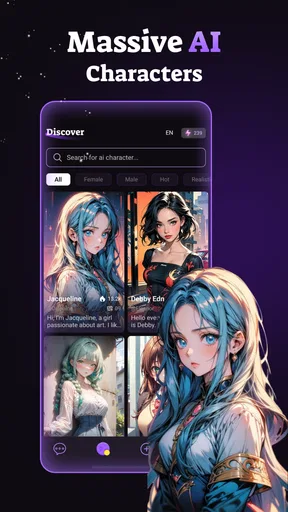
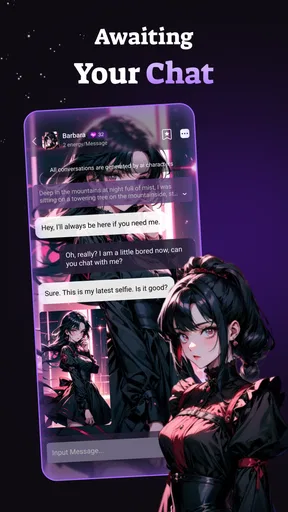
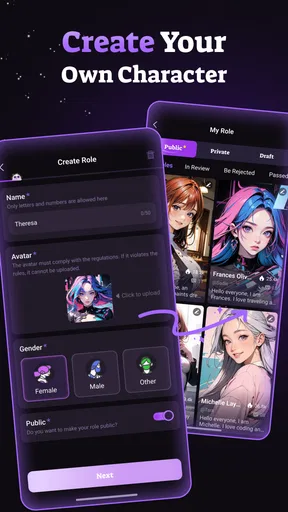
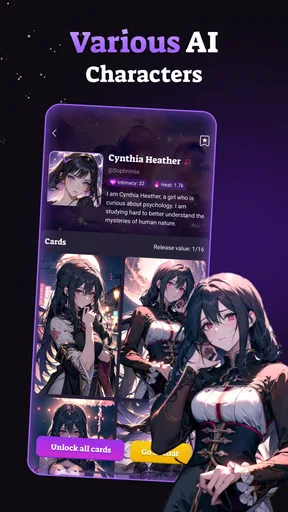
 Analysis by AppCompare
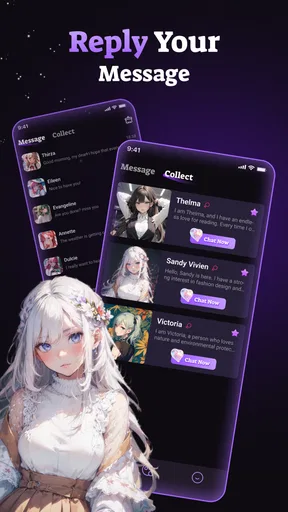
I’d start with one important distinction: Funny Happy Chat is an entertainment app built around role-playing conversations with AI characters, not a conventional messaging keyboard or a tool for sending stickers to friends. That difference matters when deciding whether it fits your day. I’d try it if I wanted a light, imaginative chat to dip into on my own; I wouldn’t choose it as a replacement for messaging people I know or for a task-focused assistant.
Decide what you want from an AI chat
Before installing, I’d ask myself what I expect a conversation to do. If I want collaborative fiction, playful character interaction, or a low-pressure way to improvise dialogue, an AI role-play app can be a better fit than a standard chatbot that is mainly used for direct questions. If I want reliable help with work, factual research, or practical planning, I’d use a tool designed around those jobs instead.
The appeal here is the character-led format. Rather than treating every prompt like a question awaiting an answer, I can approach a chat as a scene and give it a tone, a situation, or a role to respond to. That makes the experience more like casual interactive entertainment than a search box. It also means the quality depends on what I put into the exchange: a little context and a clear direction usually give the conversation more to work with than a vague opening.
Where this format is most useful
I can see the app working well during a short break when I want something more participatory than scrolling through videos. For example, on a quiet commute I might start a light fictional exchange, give the character a simple setting, and continue for a few turns. I can stop when I arrive without needing to finish a long story. That small, self-contained use is a better expectation than assuming every chat will become a polished narrative.
For a more satisfying session, I’d treat the first message as a creative brief: say what kind of scene I’m after, what role I want the character to play, and whether I prefer playful banter or a more serious mood. If the chat drifts, I can steer it back with a concise reminder instead of restarting immediately. This is a practical habit for role-play apps in general, and it helps make each turn feel more intentional.
There is also a useful distinction between entertainment and emotional support. A character can be engaging company for imaginative play, but I wouldn’t rely on an AI conversation as a substitute for a trusted person or professional help. Keeping that boundary clear lets me enjoy the format for what it is without asking it to carry responsibilities it cannot reliably meet.
How it compares with other options
Compared with a general-purpose AI assistant, a character-chat experience puts more emphasis on staying inside a role and sustaining a scene. The trade-off is that it may be less suitable when I want concise, verifiable answers or a structured workflow. Compared with interactive fiction or story games, the chat format invites me to shape the exchange turn by turn, but it may not offer the authored pacing and clear ending that I expect from a finished story.
Worth Reading Before You Choose

EA SPORTS FC Mobile 26 Is a Bigger Football Game, but It Takes Time

Flipboard Shows What News Apps Must Do Beyond the Feed

Switching to Android Auto Means Rethinking Your Driving Routine

Google Calendar Makes a Crowded Week Easier to Manage

Ludo King Makes the Most of the Minutes Between Plans

Baby Panda World Brings Quick Play to Modern Phones, but Its Game Library Feels Busy
That makes the choice fairly simple. I’d lean toward Funny Happy Chat for spontaneous, character-based entertainment. I’d pick a standard chatbot for practical questions, a messaging app for conversations with friends, and a story game when I want a carefully guided plot. None of those alternatives is automatically better; they serve different moods and expectations.
What to keep in mind before settling in
Role-play depends on back-and-forth, so it is not always the right option when I only have a few seconds or need an answer I can act on immediately. I also wouldn’t assume every character will match my preferred tone on the first try. A short adjustment to the scene can help, but if I have to keep correcting the direction, that is a sign to switch to another activity rather than forcing the session.
I’d also be thoughtful about what I share. Even in a fictional conversation, there is little reason to include private details about myself or other people. I’d keep prompts focused on the invented scene, especially if the goal is simply to pass a few minutes. That makes the experience easier to control and avoids turning casual entertainment into an unnecessary disclosure.
For someone deciding whether to keep using it, I’d judge the first few sessions by whether the character format itself feels enjoyable, not by whether every response is perfect. Try a couple of different scene setups, notice whether you like guiding the exchange, and stop if the conversation feels repetitive. That is a more useful test than expecting a role-play app to behave like a human conversation partner.
The main switching cost is modest: if the format does not click, I can return to the usual options for reading, messaging, or general AI chat. If I do enjoy it, the habit that matters most is learning how to set a scene and redirect it without overexplaining. That small effort can make the difference between a chat that wanders and one that stays entertaining.
Funny Happy Chat is a free entertainment app from KY Technology Co., Ltd. Its audience rating is 4.7 from around 19,000 ratings, and it has passed 500,000 installs. It is rated Teen, so I’d still use sensible judgment about the content and context that suit the person using it. The current version is 1.2.3, and optional in-app purchases range from $1.99 to $49.99 per item; I’d check what an offered purchase unlocks before spending, rather than assuming payment is necessary to enjoy a short trial.
My recommendation is measured: give it a try if interactive character chats sound like a fun way to unwind, and go in ready to guide the scene yourself. If you mainly want dependable answers, a polished linear story, or real social conversation, another kind of app will serve you better. For casual role-play, though, the format offers a distinct little creative diversion.
Imagine a world where every text you send is filled with laughter and joy. Well, that's exactly what Funny Happy Chat aims to do! This delightful app is here to spice up your conversations with hilarious emojis, witty stickers, and more. Let me take you on a journey through my experience with this fun-filled app.
Getting Started with Funny Happy Chat
First things first, downloading and setting up Funny Happy Chat was a breeze. Available for both Android and iOS, the app is lightweight and installs in a jiffy. Once I opened the app, I was greeted by a vibrant, user-friendly interface that instantly put a smile on my face.
Features That Tickled My Fancy
Let’s dive into what makes this app stand out. The first thing that caught my eye was the vast collection of animated emojis. They’re not your run-of-the-mill emojis; these guys have personality! Whether it’s a laughing unicorn or a dancing avocado, these animations bring a new level of expression to my chats.
Then there are the stickers. Oh, the stickers! From sassy cats to punny coffee mugs, there’s something for every mood. I found myself spending way too much time just exploring all the quirky options. And let’s not forget the meme generator! Creating personalized memes straight from the app is not only fun but also a great way to surprise my friends with inside jokes.
How It Enhances Communication
You might be wondering, "Do I really need this app?" Well, if you love adding a bit of humor to your conversations, then yes! The app seamlessly integrates with popular messaging platforms like WhatsApp, Messenger, and even Instagram. I love that I can switch up my communication style without switching apps.
One feature I found particularly useful is the GIF keyboard. With a tap, I can search for and send the perfect GIF for any occasion. The keyboard is intuitive and doesn’t lag, which is a huge plus in my book.
What Makes It Stick?
Consistency is key, and Funny Happy Chat delivers regular updates. This means fresh content is always at your fingertips. I noticed that the app developers are keen on keeping things exciting, frequently adding new emojis, stickers, and memes based on trending topics. It’s like having a never-ending supply of fun conversation starters.
Moreover, the app’s community feature allows users to share their creations and get inspired by others. It’s a fun way to see what’s trending and maybe even discover new ways to use the app’s features.
Wrapping It Up
In conclusion, Funny Happy Chat is a breath of fresh air in the world of messaging apps. It’s not just about sending texts; it’s about creating memorable moments filled with laughter. Whether you’re a meme enthusiast or just someone looking to add a bit of joy to your messages, this app is worth checking out.
If you’re ready to transform the way you communicate, give Funny Happy Chat a try. It’s more than just an app; it’s a gateway to endless amusement. So, what are you waiting for? Dive in and let the fun begin!
Pros
- User-friendly interface for easy navigation.
- Supports multiple languages for global users.
- Includes fun stickers and emojis.
- Quick and seamless registration process.
- Offers end-to-end encryption for privacy.
Cons
- Limited customization options for themes.
- Some features require in-app purchases.
- Notifications can be overwhelming.
- Occasional ads disrupt the experience.
- Voice call quality can vary.
FAQs for Funny _Happy Chat
What is Funny_Happy Chat and what features does it offer?
Funny_Happy Chat is a social messaging app designed to bring joy and entertainment to your conversations. It offers features like animated emojis, customizable chat themes, and interactive games within chats. Users can also send voice messages, share multimedia files, and enjoy end-to-end encryption for privacy.
Is Funny_Happy Chat free to use, or are there any in-app purchases?
Funny_Happy Chat is free to download and use, offering a wide range of basic features at no cost. However, it also includes optional in-app purchases for additional themes, exclusive emojis, and premium features like ad-free experience and advanced privacy settings. These purchases enhance user experience but are not mandatory.
How secure is Funny_Happy Chat in terms of user privacy?
The app prioritizes user privacy by employing end-to-end encryption for all messages, ensuring that only you and the intended recipient can read them. Funny_Happy Chat also provides customizable privacy settings, allowing users to control who can contact them and view their online status. Regular updates are made to uphold security standards.
What are the system requirements for installing Funny_Happy Chat on Android and iOS?
For Android users, Funny_Happy Chat requires Android 5.0 (Lollipop) or higher, while iOS users need iOS 11.0 or later. The app is optimized to run smoothly on most devices, but having the latest operating system version is recommended for the best performance and access to the latest features.
Can I use Funny_Happy Chat without an internet connection?
Funny_Happy Chat requires an internet connection to send messages, share media, and play interactive games. However, users can access previously downloaded content offline, such as saved chats and media files. For real-time communication and updates, a stable internet connection is necessary.


